MokaHR - Persona Editing
MokaHR is an AI-powered Applicant Tracking System (ATS) that helps companies track and hire the right talent.
I re-designed an AI-assisted workflow that helps recruiters filter candidates more efficiently.
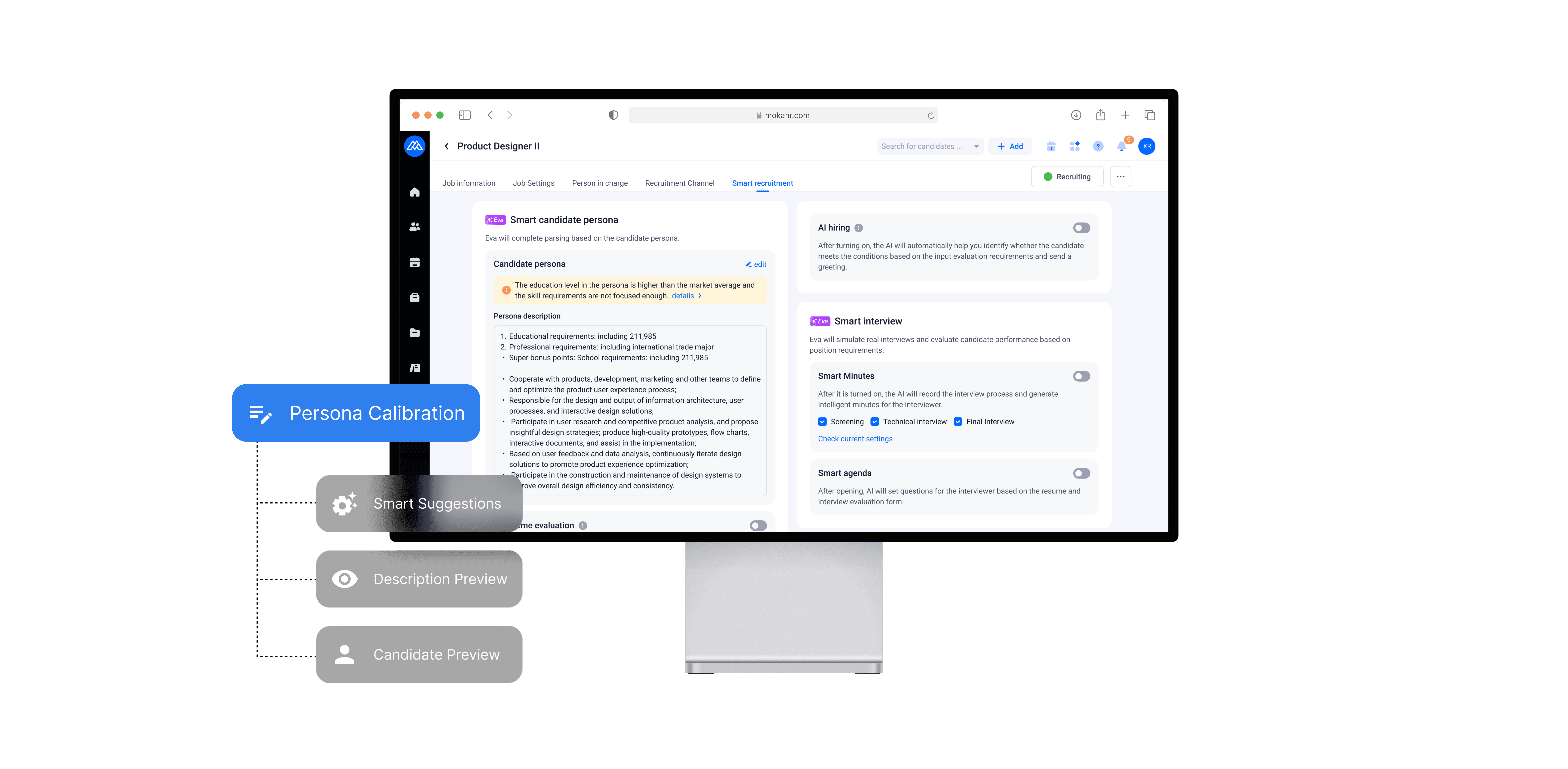
Smart recruitment settings final design, English translated
A GLIPMSE OF THE OUTCOME
Overall Improvements and impacts
The final design is now under development. The re-designed persona editing experience helps bridge the gap from previous designers working on separate initiatives. New features like candidate preview and live persona description update aims to decrease time to hire, increase user retention and AI adoption.
Role
Product designer
Strategy
Researcher
Timeline
Feb - Jun 2025
Tools
Figma
OPPORTUNITIES
I joined MokaHR as product intern to explore how AI can enhance job description workflows and support HR teams in refining candidate personas.
MY ROLE
I collaborated closely with another designer and a Product Manager. We led an end-to-end design cycle - from competitive analysis and user interviews to usability testing, high-fidelity designs, and stakeholder presentations.
THE CHALLENGE
Re-designing the persona editing experience
Personas are semi-fictional profiles to help the ATS parse through hundreds of resumes to find the ideal candidate for the role. Moka users (HR professionals) reported that they spend a big chunk of their time editing and refining candidate personas to help them parse through the talent pool.
Business value: to improve hiring process - saving time and resources
PAIN POINTS
We interviewed 4 users. Here’s what we learned:
Modifying candidate personas is a complex, ongoing process shaped by shifting priorities, misalignment between HR and hiring managers, and fear of making the wrong filtering decisions worsened by lack of timely feedback.
Lack of timely, iterative feedback loops
Hard to balance flexibility and precision in AI filtering
Repetitive edits due to evolving hiring expectations from hiring managers
Fear of making the wrong edits and missing potential candidates
HR and hiring managers have different candidate skills priorities
DEFINING THE PROBLEM
How might we give users greater control and clarity when modifying persona filters, so they can improve precision and feel more confident in the results?
We want to reduce churn and repetitive persona mapping, and increase retention through better engagement with product.
Design Oportunities
Current Design - What’s Not Working
Users make edits on the “Smart Recruitment” settings page, but the current flow reveals a couple of usability issues:
There’s no guidance on how to adjust personas for more accurate candidate filtering.
The impact of parameter changes is unclear—users can only see the updated persona description after exiting edit mode, creating a disconnect between input and outcome.
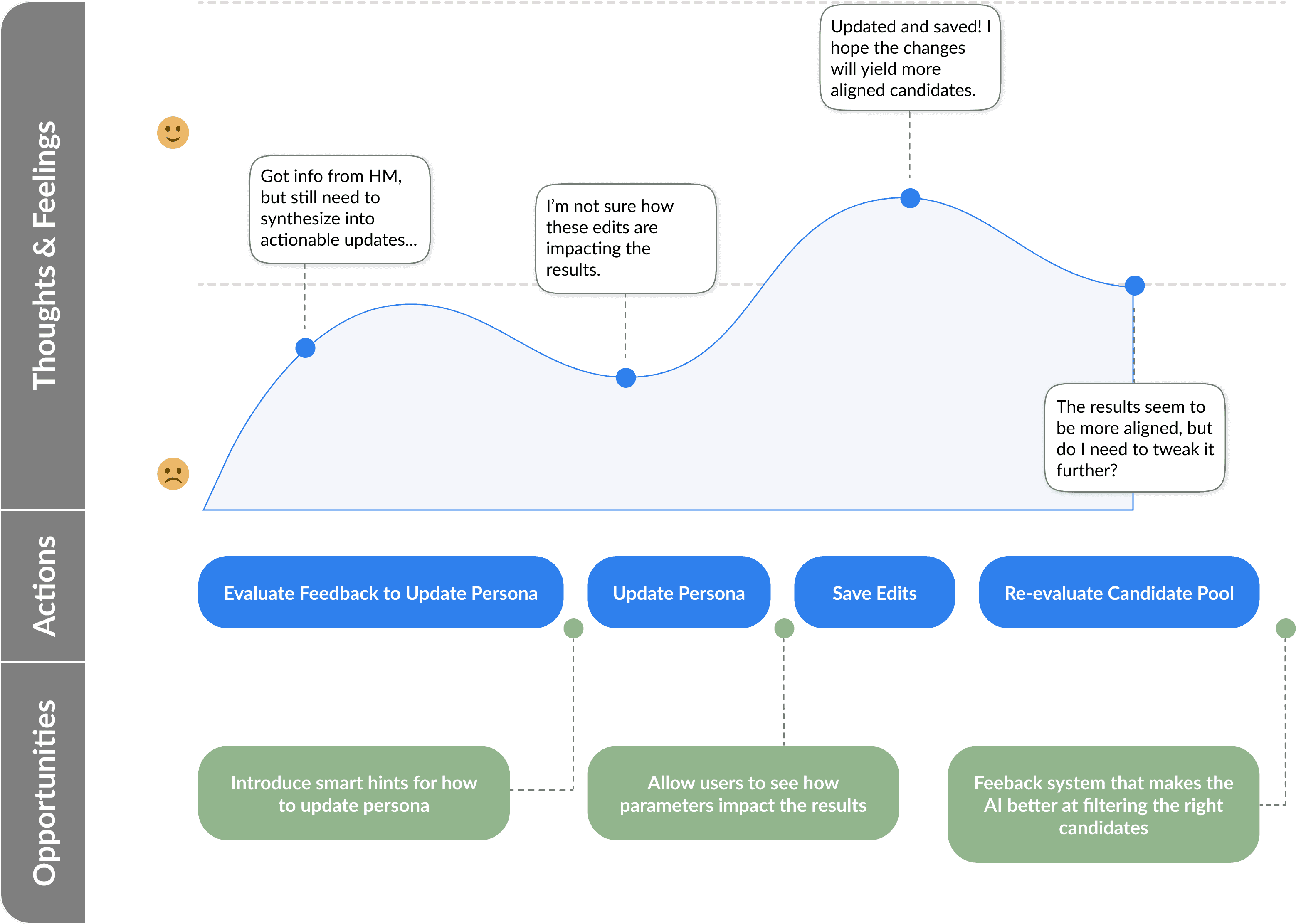
User journey flow - opportunities to improve existing experience.
DESIGN SOLUTION
Groupings and Smart Tips
First iteration improvements and concepts:
Refined the user interface by organizing settings into clearer, more relevant groups.
Introducing smart tips for users to further modify the criteria.
Smart tip provides actionable insights from market benchmarks and other performance criteria.
DESIGN SOLUTION
New Features: Description and Candidate Preview
As users adjust their evaluation criteria, candidate preview provides an immediate way to validate whether the criteria surface candidates they feel are a good fit. These tight feedback loops enable continuous refinement of the persona.
Live persona update and resume preview study
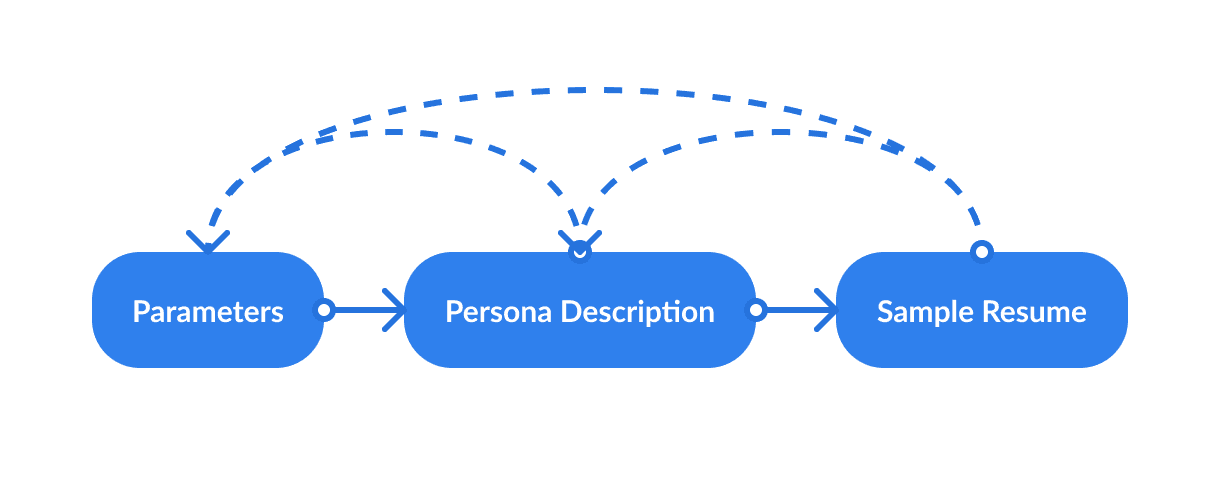
This early study revealed a lot of questions, how do the 3 components (parameters, live persona description update, and resume preview) impact one another?
DESIGNING WITH AI
The Feature That Went Away—and Came Back
During design review, our PM raised concerns that the live persona description might expose too much of the AI’s inner workings. From a user perspective, however, real-time feedback helped recruiters understand the impact of each edit without relying on a slow save-and-review flow.
After aligning with design leadership and engineering, we continued exploring the concept and clarified the system by framing the persona description and resume preview as outputs of the same parameters, with only sample resumes feeding insights back into the model.
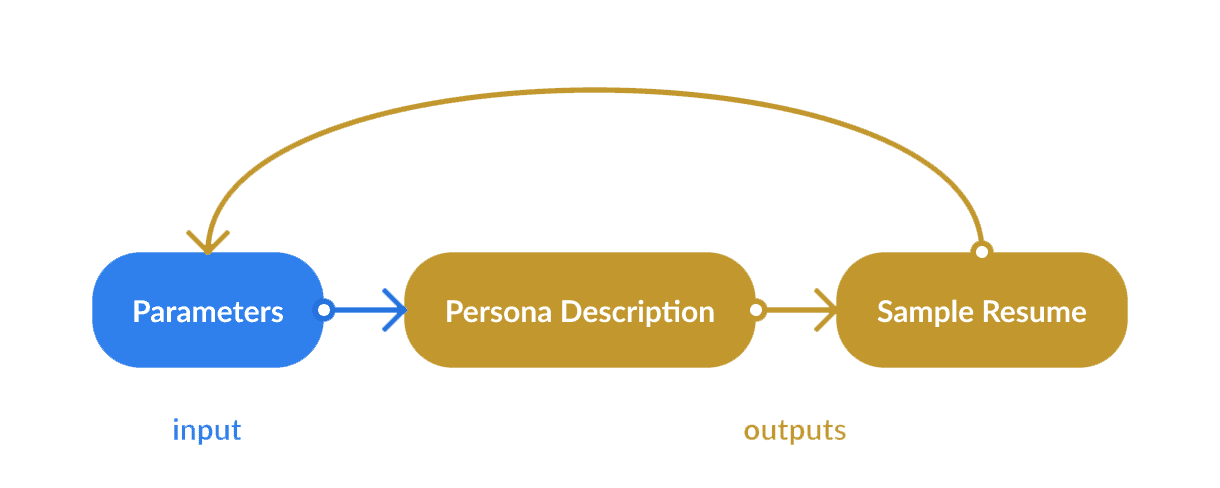
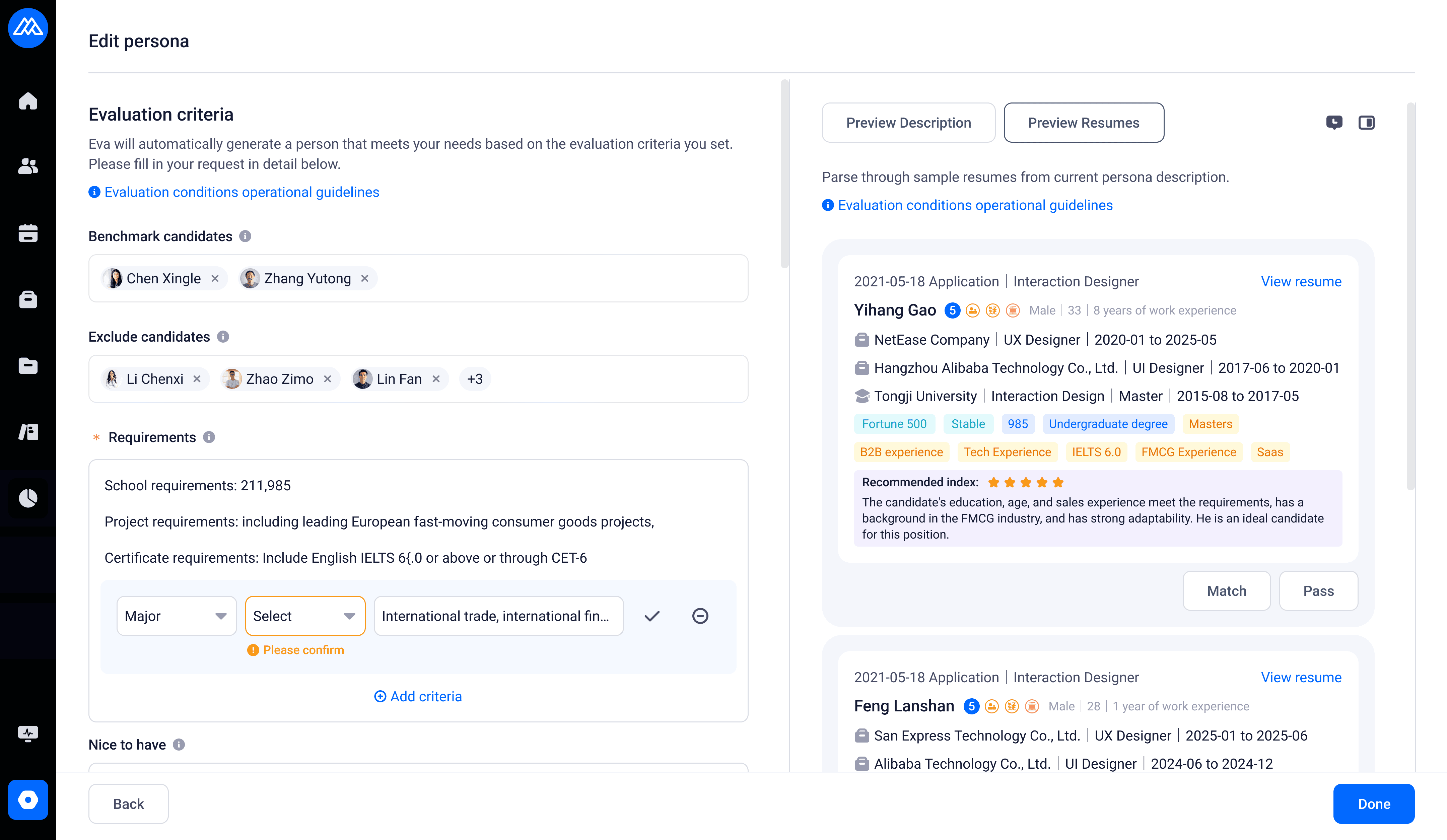
In the UI, live description and resume preview now exist as tabs in the output section
TESTING AND RESULTS
Make it even easier
We tested the prototype with 3 users and uncovered two key insights:
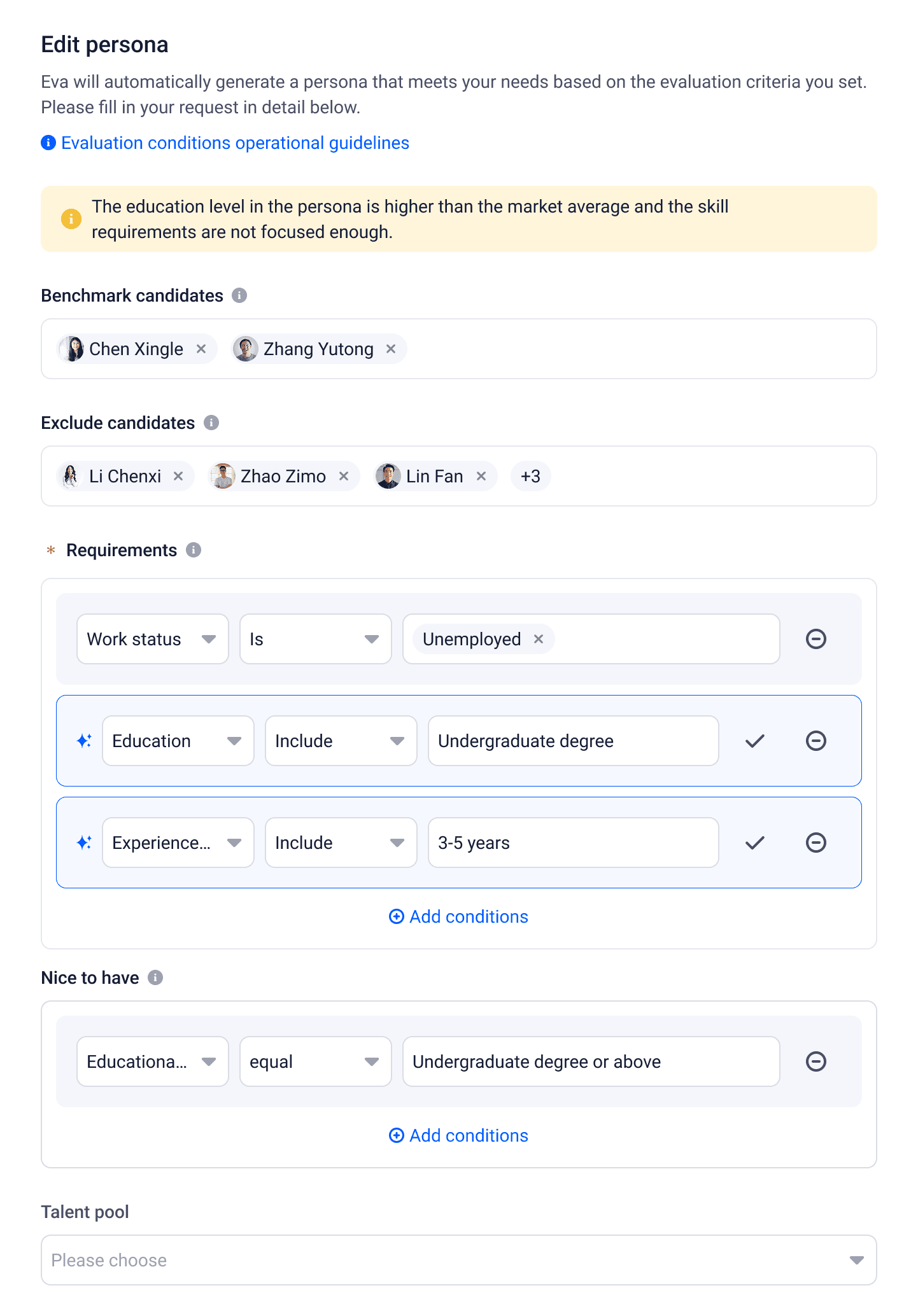
Smart tips were helpful but sometimes overwhelming and users wanted a quicker way to act on suggestions.
To address this, we introduced smart solutions - actionable prompts users can accept or decline, reducing cognitive load and improving efficiency.
DESIGN SOLUTION
Final Design Flow
The updated design clarified the persona-editing workflow by integrating AI smart tips, live updates, and sample resumes, giving HR professionals continuous feedback to refine criteria and improve candidate precision.
Final design prototype
FINAL THOUGHTS
What Went Well
Established a clear roadmap and defined workflows, ensuring consistency from concept through implementation
Conducted user interviews and synthesized actionable insights to guide key design decisions
Iterated rapidly through regular feedback loops, critiques, and lightweight user testing
Strengthened design communication by clearly articulating rationale during stakeholder reviews
Lessons and Improvements
I learned that product priorities can change rapidly, and effective design advocacy depends on backing decisions with evidence, clear rationale, and well-crafted design artifacts that help teams realign quickly.
Working remotely limited opportunities to build deeper, day-to-day relationships with engineers and the product lead. With more in-person collaboration, I could have surfaced technical constraints earlier and incorporated feedback sooner.
REACH OUT
2025 Yuxin Ren